
Digging into WooCommerce Bundle Product Weight Calculation

WooCommerce Bundle Product is a widely used extension for WooCommerce. It offers a range of features for store owners who want to sell products in bundles. The extension has been around for a long time. It’s a breeze to use and has always been my top choice for managing bundle products.
The problem
The main issue I’ve always faced as a developer is calculating the weight of a bundle product. It’s not that straightforward.
Let’s take a step back and walk through an example to visualize the problem logically. Suppose you have a bundle-type product that consists of two simple child products: Simple product one and Simple product two. The weight of Simple product one is 2 kg, and the weight of Simple product two is 3 kg. So, what do you think the total weight of the bundle should be? It should be 5 kg, right? Well, logically, yes—it is.
This is where bundle products get a little complicated. The plugin includes several settings related to weight. To start with, bundle types can be categorized into two:
- Unassembled and
- Assembled
In the assembled type, you have the option to manually enter the bundle product’s weight. In the unassembled type, the original weight is preserved.
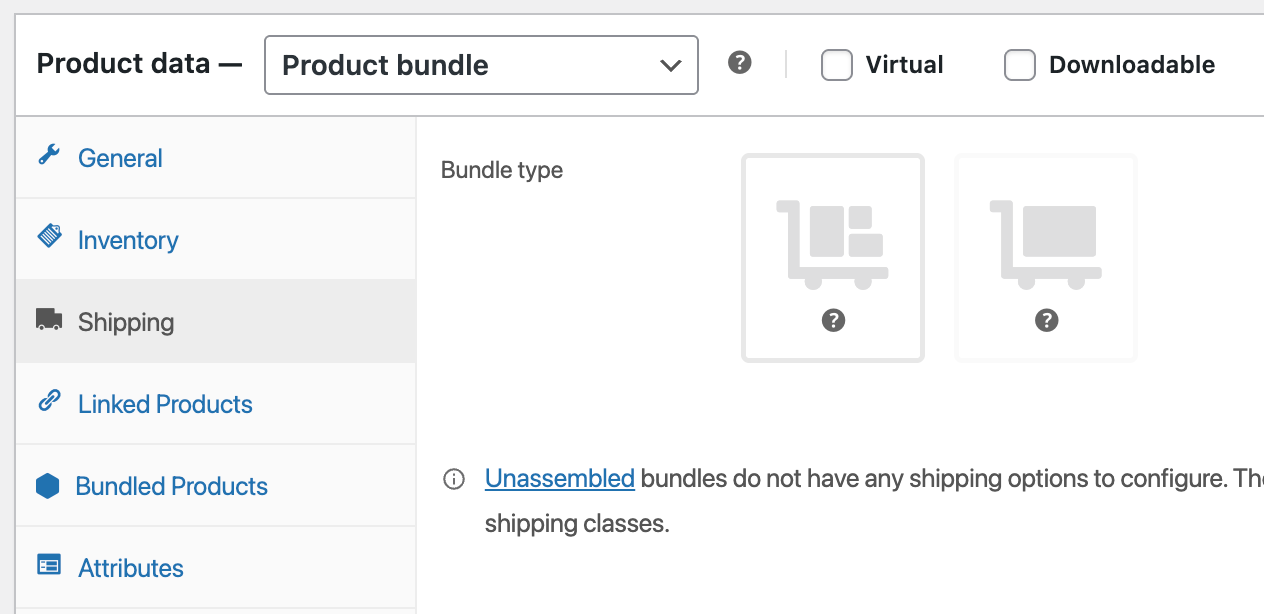
That’s not all. For the assembled bundle type, you can choose whether the assembled weight is set to Ignore or Preserve.
- Ignore means the individual weights of the child bundle products will not be counted. Only the weight you enter will be considered as the total weight of the bundle product.
- Preserve means you’re accounting for the weights of the individual child bundle products and adding them to the weight you entered.
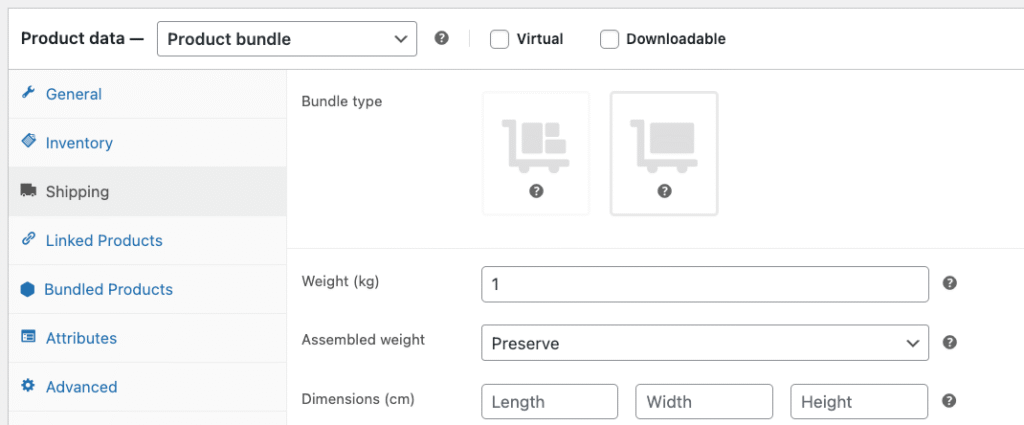
Now, if you’re a WooCommerce developer, you might assume that you can retrieve a product’s weight by calling the $product->get_weight() function, just like with other product types. However, for bundle products, this function may not return the correct weight depending on the bundle’s configuration settings
To understand this better, let’s create a few test cases and compare the expected weight with the actual weight returned by the function call. For these test cases, we’ll assume the bundle product contains two simple child products—one weighing 2 kg and the other 3 kg. For this test, we manually enter 1 kg as the bundle weight when the bundle type is set to assembled.
| Test cases | Expected weight (manual calc) | Actual weight (function call) | Value in DB (weight meta) |
|---|---|---|---|
| Bundle type = Unassembled | 5 kg | “” | n/a |
| Bundle type = Assembled Weight = 1 kg Assembled weight = Ignore | 1 kg | 1 | _weight = 1 |
| Bundle type = Assembled Weight = 1 kg Assembled weight = Preserve | 6 kg | 1 | _weight = 1 |
From this test, it’s clear that the bundle product type does not have its own implementation of the $product->get_weight() function. Instead, it simply returns the value entered in the weight field. As I dug deeper, I identified two possible reasons why the plugin might not have provided their implementation of get_weight() that respects all bundle settings.
- The plugin has evolved over time, gradually adding more features as development progressed. In its early stages, it lacked maturity and had several bugs, prompting developers to write their own solutions to address specific issues. For historical reasons, the plugin has chosen to maintain this approach—allowing developers to implement their own logic for handling weight calculations. This offers greater flexibility and accommodates a wider range of use cases.
- The second reason is performance. A bundle product is essentially a compilation of several individual products, each with its own weight and other properties. Now imagine one of the child products in your bundle gets its weight updated. You would then need to update every bundle product that includes that child item. The plugin likely wanted to avoid this overhead, opting instead for a simpler approach that doesn’t automatically recalculate bundle weights based on child product changes.
In any case, we need a reliable solution—after all, calculating the correct weight of a bundle product is essential.
The solution
We need a concrete get_weight() function implementation that accurately returns the product weight, respecting different settings. My solution was to write a custom mu-plugin for this. I chose not to override the get_weight() function directly, just in case there are future developments.
<?php
/**
 * Plugin Name:  Utility - Bundle product
 * Description:  Provide utility functions for bundle product.
 * Author:       Arif Uddin
 * Version:      1.0
 */

namespace Smuddin\Utility;

if ( ! defined( 'ABSPATH' ) ) exit;

final class BundleProduct
{
    private function __construct() {}

    public static function get_weight( $product_id )
    {
        if ( ! $product_id ) {
            return '';
        }

        $product = wc_get_product( $product_id );

        if ( ! $product ) {
            return '';
        }

        if ( ! $product->is_type( 'bundle' ) ) {
            return $product->get_weight();
        }

        /**
         * virtual products are "Unassembled" in WC bundle products.
         * We need to calcualte weight for unassembled products.
         * https://woocommerce.com/document/bundles/bundles-data-structures-storage/
         */
        $weight = 0;

        if ( $product->is_virtual() ) {
            $weight = self::get_bundle_items_weight( $product );
        } else {

            /**
             * Aggregate weight = 1, indicates that the weight of the
             * bundle product is the sum of the weights of the bundled
             * products and the weight of the bundle product itself.
             * In WC the settings is called "preserve".
             * Corresponding meta key is "_wc_pb_aggregate_weight".
             */
            if ( $product->get_aggregate_weight() ) {
                $weight = self::get_bundle_items_weight( $product );
            }

            $weight = $weight + floatval( $product->get_weight() );
        }

        return $weight;
    }

    private static function get_bundle_items_weight( $product )
    {
        $weight = 0;

        if ( ! $product instanceof \WC_Product_Bundle ) {
            return $weight;
        }

        foreach ( $product->get_bundled_items() as $item ) {
            $item_product = $item->get_product();
            $qty = $item->get_quantity();
            if ( $item_product && ! $item_product->is_virtual() ) {
                $weight += floatval( $item_product->get_weight() ) * $qty;
            }
        }

        return $weight;
    }
}Just place the entire code into a file named utility-bundle-product.php, and put it inside the wp-content/mu-plugins/ folder. You can then use the implementation like this:
$bundle_product_weight = Smuddin\Utility\BundleProduct::get_weight( $product_id );This approach doesn’t force a fix—it encourages developers to adopt it gradually, which I believe is a better strategy for existing projects. It avoids breaking things immediately and instead inspires developers to apply the fix incrementally, based on actual needs as they arise.
Discussion about this post